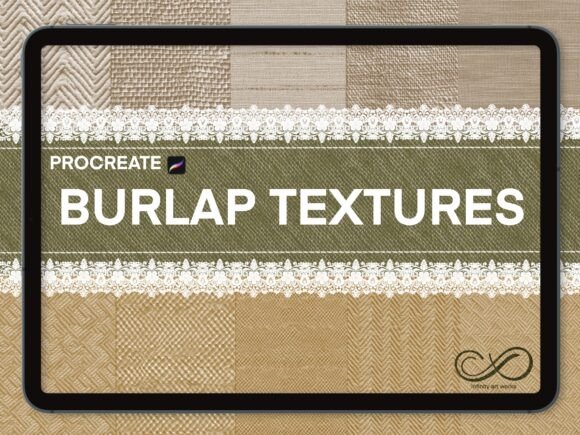
Procreate Texture Brushes-Burlap, Lace: Integrating Fabric Textures Into Digital Art
For digital artists and designers, texture plays a crucial role in adding depth and realism to visual work. The Procreate Texture Brushes-Burlap, Lace set offers a streamlined way to incorporate organic, tactile elements into Procreate projects. This bundle includes 70 burlap texture brushes, 24 lace border brushes, and a curated 30-color palette, all designed to enhance digital illustrations, designs, and mixed-media compositions. Whether you're a professional illustrator, a small business owner creating branded assets, or a hobbyist exploring digital art, this brush set provides a practical way to elevate your visual output.
How Procreate Texture Brushes-Burlap, Lace Fits Into a Creative Workflow
Texture brushes are often used to add surface variation, break up flat areas, or simulate physical materials in digital work. The Procreate Texture Brushes-Burlap, Lace set is particularly useful for artists aiming to incorporate fabric elements without scanning or importing external textures. These brushes integrate directly into the Procreate app, allowing for seamless layering, blending, and customization.
In a typical project workflow, these brushes can be used at multiple stages:
- Early stages – for sketching ideas with textured line work or setting a background tone
- Middle stages – as part of layering techniques to build dimension and surface interest
- Final stages – to add finishing touches, borders, or overlays that unify the composition
This flexibility makes the brush set a versatile tool across illustration, graphic design, branding, and digital scrapbooking workflows.
Compatibility and Setup
The Procreate Texture Brushes-Burlap, Lace set is designed specifically for use with the Procreate app on iPad devices that support the Apple Pencil or other pressure-sensitive styluses. Once purchased, users receive a download link via email. The brushes are imported directly into the app by tapping the brush icon and selecting “Import.”
Because these brushes are digital assets, they require no physical storage or setup. However, maintaining an organized brush library is essential for efficiency. Consider grouping these brushes under a dedicated folder such as “Textures” or “Fabric” to streamline access during active projects.
Practical Use Cases Across Creative Fields
Different creative professionals can integrate the Procreate Texture Brushes-Burlap, Lace set into their work in meaningful ways:
- Illustrators – Use burlap textures to simulate fabric backgrounds or aged surfaces in character or scene illustrations.
- Graphic designers – Apply lace borders to create elegant frames or decorative elements in digital layouts.
- Marketers and content creators – Add tactile depth to social media assets, digital banners, or promotional materials.
- Bloggers and educators – Enhance digital handouts, infographics, or course materials with textured visuals that engage readers.
Each of these applications benefits from the ability to apply realistic textures without leaving the Procreate environment, reducing the need for external editing tools or layered image imports.
Working with the Color Palette
The included 30-color palette is a curated selection that complements burlap and lace aesthetics. These colors are ideal for earthy, vintage, or neutral-toned projects. To use the palette effectively:
- Import it into Procreate's color panel for quick access during painting or texture application.
- Use it as a base for layering textures with matching or contrasting tones.
- Adjust individual colors to fit your project’s mood while maintaining a cohesive scheme.
For best results, consider adjusting brush opacity and blending modes to create subtle or dramatic texture overlays that enhance rather than overwhelm the design.
Tips for Efficient Texture Integration
While the Procreate Texture Brushes-Burlap, Lace set is intuitive, a few best practices can help maximize its effectiveness:
- Layer wisely – Apply textures on separate layers so they can be adjusted, masked, or removed without affecting the base artwork.
- Experiment with blending modes – Modes like Multiply, Overlay, or Soft Light can dramatically change how textures interact with underlying colors and shapes.
- Customize brush settings – Adjust pressure sensitivity, grain, or scattering to match the look you're aiming for.
- Test at full size – Some textures may appear differently at final output size; zoom in and out frequently during application.
By integrating these habits into your workflow, you'll maintain control over the visual outcome while leveraging the expressive potential of the brush set.
Long-Term Use and Organization
As your digital brush collection grows, maintaining a clean and accessible library becomes essential. The Procreate Texture Brushes-Burlap, Lace set should be stored in a clearly labeled brush group within the app. Consider renaming brushes or adding notes if you modify settings for specific uses.
Over time, you may find that certain brushes are used more frequently than others. Grouping favorites or creating brush presets can help reduce selection time during active projects. Additionally, backing up your brush library ensures that your preferred tools remain accessible even if you switch devices or reinstall the app.
Final Thoughts on Implementation
The Procreate Texture Brushes-Burlap, Lace set is more than a collection of digital tools—it’s a practical solution for adding depth and character to digital work without compromising efficiency. Whether used for illustration, design, or mixed media, these brushes offer a high level of customization and compatibility within the Procreate ecosystem.
By understanding how to integrate them into your existing workflow, you can streamline the creative process while achieving professional results. The key is to treat these brushes as part of a broader toolkit—using them alongside other digital assets, planning techniques, and execution strategies to support your creative or business goals.