Photoshop Watercolor Brushes: A Practical Toolkit for Creative Designers
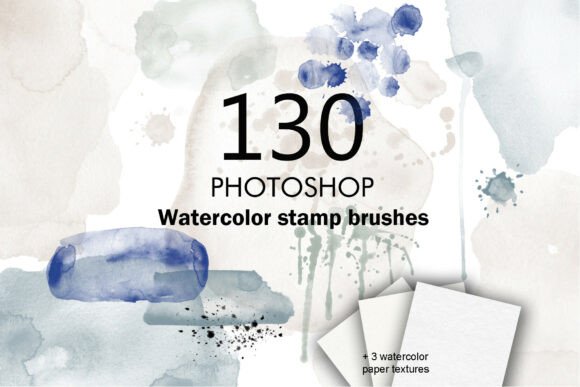
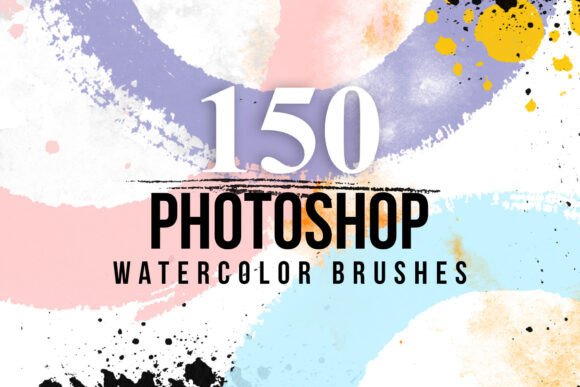
For designers seeking to blend traditional artistry with digital precision, the Photoshop Watercolor Brushes pack offers a compelling solution. This collection of 150 high-resolution brushes brings the organic texture and fluidity of watercolor into the digital workspace, making it a versatile asset for a wide range of creative professionals.
What Makes Photoshop Watercolor Brushes Stand Out?
At its core, this brush set is designed to replicate the nuanced behavior of real watercolor strokes. Each brush preserves its original pixel size—up to 2900 px—ensuring crisp, detailed application even at larger scales. The ABR format ensures seamless integration with Photoshop CS6 and newer versions, allowing for a quick drag-and-drop installation.
Unlike generic brush sets that can feel flat or overly stylized, these brushes retain the irregular edges and granular textures characteristic of traditional watercolor media. This authenticity makes them especially valuable for creatives aiming to infuse their digital work with a handcrafted aesthetic.
Key Features and Practical Benefits
- High-resolution detail – Pixel sizes up to 2900 px ensure sharp results even in print or large-format designs.
- Compatibility – Works with Photoshop CS6 and all subsequent versions, including the latest Creative Cloud releases.
- Easy installation – No configuration needed; simply drag the ABR file into Photoshop’s Brushes panel.
- Versatile application – Suitable for branding, editorial design, digital illustration, invitations, and more.
Real-World Use and Performance
In practical use, the Photoshop Watercolor Brushes perform well across a variety of design contexts. For instance, a freelance illustrator working on a children’s book might use the softer wash brushes to create gentle backgrounds, while a graphic designer crafting a wedding invitation suite could layer multiple brush textures for depth and dimension.
One notable strength is the brushes’ responsiveness to pressure-sensitive tablets. This allows for natural variation in stroke weight and opacity, mimicking the tactile experience of painting on paper. However, users without a stylus may find the results less dynamic, as the brushes rely on pressure input to achieve full expressive range.
Who Will Benefit Most?
This brush set is particularly well-suited for:
- Graphic designers – Enhancing brand assets with a painterly touch.
- Illustrators and digital artists – Creating textured base layers or finishing effects.
- Marketing professionals – Adding visual interest to promotional materials or social media assets.
- Wedding and event designers – Crafting custom invitations and stationery.
- Educators and content creators – Demonstrating digital painting techniques or preparing instructional visuals.
Quality and Usability Considerations
The brushes are well-organized and labeled, though they do not come with a pre-sorted folder structure. Users may want to take a few minutes to categorize brushes by type (e.g., splatters, washes, hard edges) for faster access during intensive projects.
From a consistency standpoint, the brushes maintain their quality across different zoom levels and blending modes. However, some users may find that certain brushes produce slightly uneven results when scaled beyond 100%. This is a common limitation with high-resolution raster brushes and can usually be mitigated by adjusting brush spacing or using layer masks for cleanup.
Long-Term Value and Workflow Integration
For creatives who frequently work on projects requiring a hand-painted feel, the Photoshop Watercolor Brushes offer lasting utility. The set is comprehensive enough to serve as a primary watercolor toolkit in most design workflows, reducing the need to source additional brushes from disparate locations.
That said, the set does not include texture overlays or vector assets, which may be a consideration for designers who prefer hybrid workflows. Also, while the brushes are excellent for adding texture and depth, they are not a substitute for actual watercolor scanning or advanced brush dynamics found in specialized digital painting software.
Practical Recommendations
For best results, consider the following:
- Use a pressure-sensitive stylus – To take full advantage of natural stroke variation.
- Experiment with blending modes – Try Multiply or Color modes for realistic layering effects.
- Adjust flow and opacity settings – To simulate traditional watercolor layering techniques.
- Create custom presets – Save favorite brush combinations for quick recall in future projects.
- Back up your brush library – Ensure your ABR file is saved separately to avoid reinstallation hassles.
Final Thoughts
The Photoshop Watercolor Brushes collection is a solid investment for designers who want to incorporate authentic watercolor aesthetics into their digital work. It strikes a good balance between accessibility and creative flexibility, making it suitable for both beginners exploring watercolor effects and seasoned professionals needing a reliable toolkit.
While it won’t replace the tactile experience of painting on paper, it comes close enough to be a valuable addition to most digital workflows. If your work regularly involves branding, editorial illustration, or any form of visual storytelling, this brush set is worth considering as a go-to resource for expressive, textured design elements.