130 Watercolor Brushes for Photoshop: A Practical Review for Digital Artists
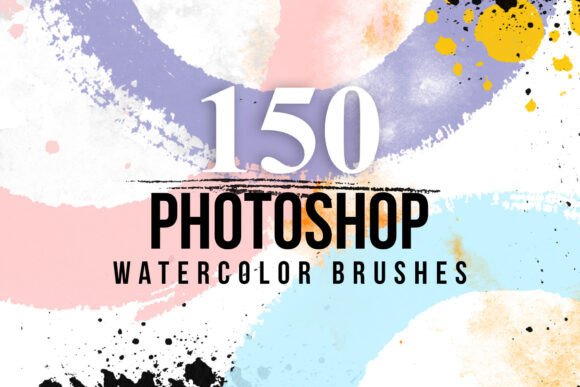
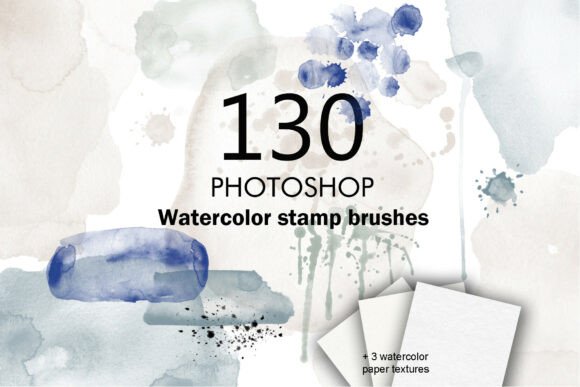
The 130 Watercolor Brushes for Photoshop is a comprehensive brush set designed to bring organic, hand-painted textures into digital design workflows. It includes two ABR files—one with 87 watercolor spot brushes and another with 43 splash brushes—along with three watercolor paper textures and a PDF guide for installation. This collection is particularly useful for designers, illustrators, and hobbyists who want to infuse their digital work with a tactile, artistic quality without the mess of traditional watercolor.
What Sets 130 Watercolor Brushes for Photoshop Apart?
Unlike generic brush sets that offer a few watercolor-style tools, this collection provides a wide variety of marks, from soft blots to dynamic splatters. The organization into two ABR files helps users manage brush selection efficiently. The inclusion of watercolor paper textures further enhances the realism, allowing for layered effects that mimic physical media more convincingly than brush strokes alone.
This set is also notable for its ease of use. The installation PDF ensures that even beginners can integrate the brushes into Photoshop without difficulty. The brushes are pressure-sensitive, responding well to stylus input, which makes them suitable for both detailed illustration and expressive sketching.
Comparing 130 Watercolor Brushes for Photoshop with Other Brush Sets
When evaluating brush sets for watercolor effects, it’s helpful to consider both variety and usability. Many free or low-cost brush packs offer only a handful of brushes, often lacking consistency in texture and behavior. In contrast, the 130 Watercolor Brushes for Photoshop provides a substantial library that covers a broad visual range, making it a more versatile option for extended projects.
Higher-end commercial brush sets may include additional features like custom brush dynamics, layered presets, or compatibility with other software. However, these often come at a premium price and may not be necessary for users who primarily work in Photoshop and prefer a straightforward setup. For most digital artists, especially those focused on invitations, scrapbooking, or web graphics, this set strikes a practical balance between functionality and accessibility.
Strengths and Limitations
One of the main strengths of this brush collection is its versatility. The combination of 87 spots and 43 splashes allows for a wide range of compositions, from subtle background textures to bold, expressive strokes. The included paper textures add another layer of depth, enabling users to simulate real watercolor paper grain without additional downloads or purchases.
However, the set does have some limitations. Because it's designed specifically for Photoshop, users of other platforms like Procreate, Affinity Photo, or Corel Painter may find compatibility issues. Additionally, while the brushes are customizable, they do require some familiarity with Photoshop’s brush engine to adjust settings like scattering, opacity, and blending modes effectively.
Best-Use Scenarios
This brush set is ideal for designers working on digital illustrations, greeting cards, wedding invitations, and scrapbook layouts. Its organic textures make it especially useful for projects where a handcrafted feel is desired but physical painting isn't feasible. For example, a digital artist creating a botanical illustration can layer different brush textures to simulate water absorption and pigment bleeding, achieving a more natural look than standard Photoshop brushes allow.
Photographers can also benefit from using these brushes to add soft edges or vintage overlays to portraits or editorial images. The splash brushes, in particular, can be used to create painterly transitions or subtle grunge effects that enhance the mood without overpowering the subject.
When to Consider Alternatives
If your workflow involves multiple digital art platforms or requires advanced brush dynamics beyond what Photoshop offers, you may want to explore cross-application brush sets or custom brush libraries. Some alternatives offer animated brushes, video tutorials, or integration with stylus-specific features, which could be more suitable for advanced illustrators or educators.
For users who only occasionally need watercolor effects, free brush sets or built-in Photoshop presets might be sufficient. However, these often lack the richness and consistency found in the 130 Watercolor Brushes for Photoshop, making them less ideal for professional or frequent use.
Customization and Workflow Integration
One of the set’s key advantages is its adaptability. Each brush can be modified within Photoshop’s brush settings to adjust size, opacity, flow, and scattering, allowing for a high degree of personalization. Artists can mix and layer different brushes to create complex textures or simulate multiple layers of watercolor washes.
For example, using a soft blot brush as a base layer and overlaying it with a light splatter brush can mimic the natural variation seen in real watercolor paintings. The included paper textures can be applied as layer masks or background overlays to enhance the illusion of physical media, especially when printed or viewed on textured digital displays.
Value and Accessibility
Priced competitively among mid-tier brush sets, the 130 Watercolor Brushes for Photoshop offers good value for its size and quality. The inclusion of installation instructions makes it accessible even to those new to brush customization, while the variety ensures that experienced users will find it useful for diverse projects. Compared to purchasing multiple smaller brush packs, this bundle offers a more cohesive and cost-effective solution.
It's also worth noting that the file size is relatively small, making it easy to download and install without consuming excessive storage space. The brushes are compatible with recent versions of Photoshop, including both desktop and cloud-based access via Adobe Creative Cloud.
Final Thoughts
The 130 Watercolor Brushes for Photoshop is a well-rounded brush set that delivers realistic watercolor effects with minimal setup. It stands out for its thoughtful organization, included textures, and responsiveness in Photoshop. While it may not replace more advanced or multi-platform brush collections, it offers a practical and effective solution for digital artists seeking a hand-painted aesthetic without the learning curve or cost of premium alternatives.
Whether you're designing a digital scrapbook, enhancing a digital painting, or adding texture to a photo project, this set provides the tools to achieve professional results efficiently. For most Photoshop users looking to explore watercolor-inspired design, it’s a solid choice that balances quality, variety, and usability.