Enhance Your Designs with Photoshop Elements Brushes Roses Set Two
Adobe Photoshop Elements users are always on the lookout for tools that can elevate their creative projects. Photoshop Elements Brushes Roses Set Two is a premium brush pack designed specifically for this platform, offering a unique blend of elegance and versatility. Whether you're crafting digital art, designing invitations, or enhancing photo collages, this brush set brings the timeless beauty of roses directly to your canvas.
What Is Photoshop Elements Brushes Roses Set Two?
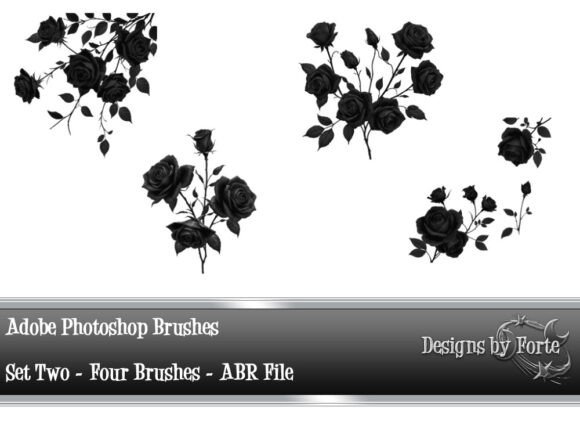
Photoshop Elements Brushes Roses Set Two is a downloadable digital resource that includes four high-quality PNG files and one ABR brush file. The ABR file can be easily loaded into Adobe Photoshop and Photoshop Elements, allowing you to use the rose brushes just like any other brush in the program. Each brush is crafted with detailed textures and vibrant color palettes that reflect the natural allure of roses.
This set is ideal for graphic designers, scrapbookers, digital artists, and anyone who wants to infuse their work with the sophistication of floral motifs. The inclusion of PNG files also makes it easy to place rose graphics directly into layouts without needing to use the brush tool at all.
Common Creative Challenges and How This Brush Set Helps
Many Photoshop Elements users struggle with finding the right balance between creativity and efficiency. They want to create visually compelling designs but may not have the time or skill to draw or paint intricate floral elements from scratch. Others may find that generic brushes lack the detail or uniqueness needed to stand out.
Photoshop Elements Brushes Roses Set Two addresses these concerns by offering ready-to-use, high-resolution rose graphics that maintain a natural, hand-painted feel. The brushes are scalable without losing quality, making them suitable for both small embellishments and large design features. Additionally, the PNG files can be layered, recolored, and manipulated to fit a wide range of themes and color schemes.
Practical Applications for Photoshop Elements Brushes Roses Set Two
Designers can apply this brush set in numerous ways, depending on their project type and audience. Here are some practical examples:
- Wedding Invitations: Use the rose brushes to create elegant borders or background elements that evoke romance and sophistication.
- Scrapbooking: Add floral accents to digital scrapbook pages for a soft, natural touch that complements photos beautifully.
- Logo Design: Incorporate subtle rose elements into branding or logo concepts for businesses related to beauty, wellness, or luxury.
- Photo Overlays: Blend rose graphics with portraits or still-life images to add depth and a dreamy aesthetic.
- Print-on-Demand Products: Design custom greeting cards, mugs, or phone cases with floral themes that appeal to a wide audience.
Because the brushes and PNG files are compatible with both Photoshop and Photoshop Elements, users can seamlessly integrate them into their existing workflow without needing additional software or plugins.
How to Get the Most from Photoshop Elements Brushes Roses Set Two
While the brushes are easy to install and use, there are a few best practices that can help you maximize their impact:
- Experiment with Blend Modes: Try overlay, soft light, or multiply blending modes to create different effects and integrate the roses more naturally into your designs.
- Customize Colors: Use adjustment layers or hue/saturation tools to recolor the roses to match your project’s color scheme.
- Layer for Depth: Combine multiple rose brushes or PNGs to build dimension and create lush, full floral arrangements.
- Scale Smartly: Since the brushes are vector-based, they can be resized without losing clarity. Start large and scale down for sharp details.
- Use in Combination with Other Brushes: Pair the roses with foliage or foliage brushes to create complete floral compositions.
By taking the time to explore these options, users can tailor the brushes to their specific needs and elevate the overall look of their projects.
Who Can Benefit from This Brush Set?
Photoshop Elements Brushes Roses Set Two is versatile enough to appeal to a wide audience:
- Beginners: Those new to Photoshop Elements can use the brushes to enhance their designs without needing advanced drawing skills.
- Intermediate Users: Designers with some experience can layer, blend, and customize the brushes to create more complex compositions.
- Professionals: Seasoned designers can integrate the brushes into client projects, saving time while maintaining a high aesthetic standard.
Each user group may approach the brush set differently, but all benefit from the ease of use and visual impact it provides.
Final Thoughts
Photoshop Elements Brushes Roses Set Two is more than just a decorative tool—it's a versatile design asset that empowers users to create beautiful, professional-quality work with minimal effort. Whether you're enhancing a personal project or designing for clients, this set offers the flexibility, detail, and elegance needed to bring your vision to life.
By incorporating this brush set into your creative toolkit, you’ll not only streamline your workflow but also elevate the emotional and visual appeal of your designs. The natural beauty of roses, combined with the technical ease of use in Photoshop Elements, makes this set a must-have for any designer looking to add a touch of timeless elegance to their work.