Unlocking Creativity with Eclectic Brushes 1: A Must-Have Tool for Digital Artists
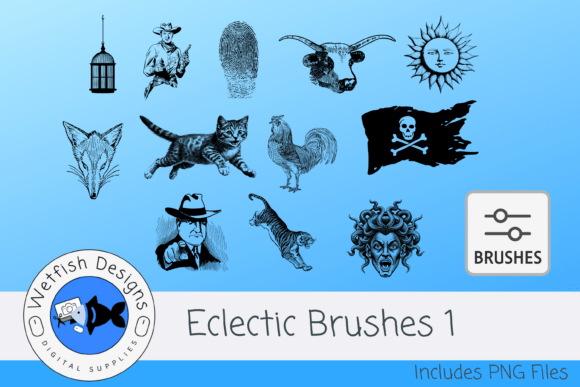
For digital artists, mixed media creators, and design enthusiasts, finding the right tools can make all the difference. Enter Eclectic Brushes 1 — a versatile set of 12 dynamic Photoshop brushes designed to elevate your creative projects. Whether you're working on collages, junk journals, or digital decoupage, this brush set brings a new level of texture and depth to your work.
What Makes Eclectic Brushes 1 Stand Out?
Each of the 12 brushes in the Eclectic Brushes 1 collection is crafted with precision, offering a distinct visual effect. From soft gradients that blend seamlessly into your artwork to bold, intricate patterns that add visual drama, this set is built to cover a wide creative spectrum. The brushes are optimized for Adobe Photoshop, making them an ideal choice for digital artists who rely on industry-standard software.
But what truly sets this brush pack apart is its flexibility. Whether you're layering textures in a digital scrapbook or adding grunge elements to a photo manipulation, these brushes provide the control and quality needed to bring your vision to life.
How to Use Eclectic Brushes 1 in Photoshop
Using Eclectic Brushes 1 is straightforward. Simply drag the included .abr file into Photoshop, and the brushes will load directly into your Brushes panel. From there, you can adjust opacity, flow, and blending modes to achieve the exact look you're aiming for.
For those new to brush customization, this set is a great starting point. You can experiment with layering different textures, combining them with your own brush presets, or even modifying the brush dynamics to suit your workflow. The included PNG files, saved at 300dpi with transparent backgrounds, also allow you to create custom brushes in other software or use them as digital stamps in design applications like Procreate, Affinity Designer, or Canva.
Perfect for Mixed Media and Digital Design Projects
Eclectic Brushes 1 is especially well-suited for mixed media artists who work across both physical and digital formats. The textures included mimic real-world elements like paper, ink, paint splatters, and fabric, allowing for seamless integration into digital collages or layered compositions.
- Collage artists can use these brushes to blend digital and scanned elements.
- Junk journal creators will find the textures ideal for adding aged, handcrafted looks to digital pages.
- Graphic designers can incorporate the brushes into web assets, social media visuals, or print materials for a tactile feel.
Because each brush delivers a unique finish, you can mix and match them to create depth, dimension, and movement in your designs. Whether you're going for a vintage aesthetic or a modern, edgy look, these brushes help you achieve professional results without spending hours on manual texture overlays.
Real-World Applications and Creative Possibilities
Let’s say you're designing a digital mood board for a client. With Eclectic Brushes 1, you could easily add subtle background textures that give the board a tactile, curated feel. Or imagine you're creating a series of digital greeting cards — the PNG brush images can be used as stamps, saving you time while maintaining a handcrafted appearance.
Another practical use is in photo editing. By layering a grunge brush over a portrait, you can give it a dramatic, vintage tone. Or use a soft gradient brush to blend multiple images together in a composite. The possibilities are only limited by your imagination.
Why Digital Artists Should Consider Eclectic Brushes 1
There are thousands of brush sets available online, but not all are created equal. Here's why Eclectic Brushes 1 deserves a place in your digital toolkit:
- High-quality textures — Each brush is designed to deliver clean, detailed results.
- Compatibility — Works seamlessly with Photoshop and can be adapted for use in other programs.
- Versatility — Perfect for a wide range of projects, from digital art to scrapbooking and beyond.
- Ready-to-use PNGs — Ideal for those who don’t use Photoshop or want to build their own brush libraries.
Whether you're a beginner or a seasoned pro, this brush set is a smart investment that can save time while enhancing the visual appeal of your work.
Getting the Most Out of Your Brush Set
To truly maximize the potential of Eclectic Brushes 1, consider these tips:
- Experiment with blending modes — Try overlay, multiply, or soft light to see how the textures interact with your artwork.
- Layer multiple brushes — Combine two or more textures to create complex, one-of-a-kind effects.
- Customize brush settings — Adjust spacing, scattering, and size jitter to create organic, hand-drawn looks.
- Save your favorite combinations — Create new brush presets that suit your unique style and project needs.
By taking the time to explore the capabilities of each brush, you'll develop a deeper understanding of how to manipulate texture and light in your digital work.
Final Thoughts
Eclectic Brushes 1 is more than just a brush set — it's a creative toolkit that empowers digital artists to express themselves with greater depth and authenticity. Whether you're building a digital journal, designing a collage, or enhancing your photo art, these brushes offer the flexibility and quality needed to bring your ideas to life.
If you're looking for a way to add character, texture, and dimension to your digital projects without the hassle of scanning or photographing real-world materials, Eclectic Brushes 1 is a smart, efficient, and inspiring choice.