Alphabet Brush Stamps for Procreate: A Practical Tool for Digital Creatives
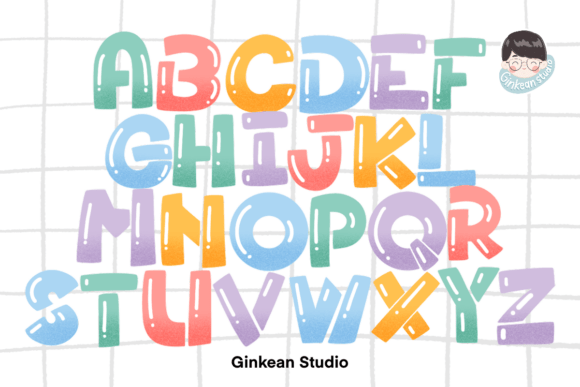
For digital artists and content creators using Procreate, having the right tools can significantly streamline the design process. One such tool gaining attention is the Alphabet Brush Stamps pack — a set of 26 uppercase letter brushes designed specifically for use within the Procreate app. This resource offers a unique way to incorporate stylized text into digital projects without the need for external editing software.
What Makes Alphabet Brush Stamps Unique?
Alphabet Brush Stamps are not traditional fonts or text tools. Instead, they are brush-based stamps that allow users to "paint" letters directly onto the canvas. Each letter is a pre-designed brush that maintains its visual integrity regardless of size or pressure applied. This makes them ideal for creating cohesive, handcrafted lettering with a consistent texture or style.
Unlike standard text layers, these stamps preserve the organic, brush-like quality of hand-drawn letters. They are especially useful for artists who want to maintain a tactile, artistic feel in their typography rather than relying on crisp, computer-generated fonts.
How It Compares to Other Text Tools in Procreate
Procreate offers multiple ways to add text: freehand drawing, importing fonts via the text feature, or using brush-based tools like Alphabet Brush Stamps. Each method has its own strengths and limitations.
- Freehand lettering offers full creative control but requires time, skill, and consistency.
- Text layer functionality allows for quick, editable text but lacks the organic, textured look of hand-drawn styles.
- Brush-based stamps offer a middle ground — they provide speed and consistency while maintaining a handcrafted appearance.
Alphabet Brush Stamps stand out by eliminating the need for manual lettering while preserving the aesthetic of brushwork. This is especially valuable for creators who want efficiency without sacrificing visual authenticity.
Use Cases and Best-Fit Scenarios
These brush stamps are particularly useful in a variety of digital creation scenarios:
- Social media content — Ideal for Instagram posts, quote graphics, and promotional banners where visual cohesion is key.
- Digital planners and journals — Help maintain a consistent, hand-drawn aesthetic across headers, labels, and annotations.
- Personalized illustrations — Great for adding names, titles, or short phrases in a stylized format without needing to redraw each letter.
- Quick design mockups — Speed up the process when time is limited but a polished, organic look is still desired.
However, they are not intended for long-form text or complex layout design. Their strength lies in short, impactful lettering rather than paragraph formatting or detailed typographic control.
Strengths and Limitations
Like any digital tool, Alphabet Brush Stamps come with distinct advantages and tradeoffs:
Strengths:
- Fast and intuitive to use — no need to redraw letters from scratch.
- Maintains a consistent brush-based style across all letters.
- Works natively within Procreate — no need for external applications or file imports.
- Commercial use permission allows for professional application in client work or product creation.
Limitations:
- Limited to uppercase letters only — no lowercase or special characters.
- No built-in spacing or kerning adjustments — requires manual placement.
- May not suit all artistic styles — users may need to modify or combine with other brushes for a custom look.
- Only compatible with the latest version of Procreate — older versions may not support brush functionality as intended.
When to Choose Alphabet Brush Stamps
Choosing the right tool depends on the specific needs of a project. Alphabet Brush Stamps are a strong choice when:
- You're working within Procreate and want to avoid switching between apps.
- Your design benefits from a hand-painted or brush-textured aesthetic.
- You need to create short, stylized text elements quickly and consistently.
- You're designing for digital products, social media, or printable planners where organic visuals are preferred.
If your work requires extensive text formatting, variable case options, or tight spacing control, you may be better served by Procreate’s built-in text tool or by using a font editor in combination with brush textures.
Practical Comparisons
Consider the following real-world scenarios where Alphabet Brush Stamps might be more or less appropriate:
- Scenario 1: You're creating a set of motivational quote graphics for Instagram. Alphabet Brush Stamps allow you to quickly add stylized headers that match your brush-based illustrations, maintaining a cohesive look across posts.
- Scenario 2: You're designing a digital journal with multiple sections. While the stamps work well for section titles, you may need to supplement them with freehand lettering or imported fonts for subheadings and body text.
- Scenario 3: You're working on a logo concept for a client. In this case, the stamps may not offer enough flexibility for custom lettering or detailed typographic refinement, making them a less ideal choice.
Final Considerations
Alphabet Brush Stamps for Procreate offer a practical solution for digital artists and designers who want to incorporate stylized, brush-based lettering without the complexity of manual drawing. Their ease of use, compatibility with Procreate, and flexibility in commercial applications make them a valuable addition to a creator’s toolkit — especially when used in the right context.
Ultimately, the decision to use Alphabet Brush Stamps should be based on your specific workflow, aesthetic preferences, and project requirements. When paired with other tools and techniques, they can enhance your digital creations while preserving the organic charm of brush-style lettering.